
Direct SQL access to Business Central in 2 minutes
BC Extension
.NET Component
SQL Database
Trusted by Microsoft Dynamics partners and customers across Europe
Choose your infrastructure
BC2SQL works in both cloud and on-premise. Choose what fits your existing setup.
Cloud – Azure SQL
Perfect if you don't have existing SQL licenses or want to avoid server maintenance.
Benefit
- No hardware maintenance
- Automatic backup and updates
- Scalable as needed
- Access from anywhere
- No large upfront costs
Considerations
- Monthly Azure cost
- Requires internet connection
- Data in the cloud (if that's a concern)
Recommendation
Choose Cloud if you don't have existing SQL Server licenses, or if you want minimal maintenance. Most new customers choose this solution.
On-Premise – Own SQL Server
Ideal if you already have SQL Server licenses and infrastructure you want to utilize.
Benefit
- Utilize existing licenses
- Full control over hardware
- Data stays on-premise
- No ongoing cloud costs
- Integration with existing systems
Considerations
- You handle backup and maintenance
- Requires server capacity
- IT department must maintain
Recommendation
Choose On-Premise if you already have SQL Server licenses and your IT department prefers to keep data internal. Ideal for companies with existing on-premise infrastructure.
Choose your setup
BC2SQL is designed to be simple. You decide whether to do it yourself or have our help.
Do-it-yourself
For the technically competent customer who wants full control
- Install BC Extension
- Install .NET component (BC2SQL.exe)
- Connect to SQL (Cloud or On-Prem)
- Configure tables and fields in BC
- Start synchronization
With our help
We guide you through or run the entire installation
- We hold a setup meeting (Teams/remote)
- We get access to your systems (temporarily)
- We install and configure all components
- We test and validate the data flow
- You get documentation and training
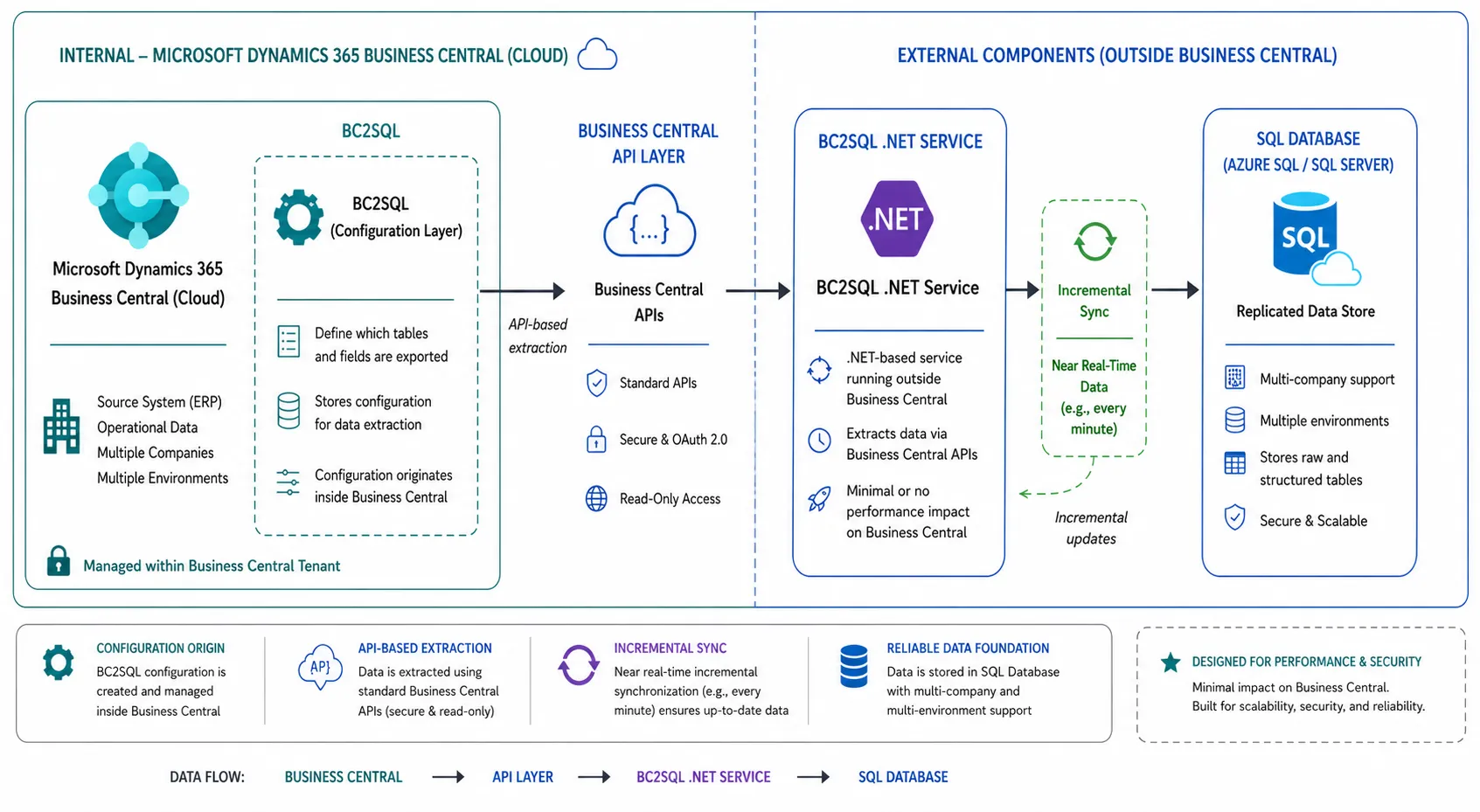
Technical Architecture
Three components working together. Install where it suits you best.
BC Extension
.NET Component
SQL Database
Why BC2SQL over standard API?
See how we beat Business Central's built-in API on all parameters
How It Works
Once the three components are installed, everything runs automatically
Select data in Business Central
Automatic Synchronization
Your data is ready
Everything you need – nothing you don't
BC2SQL is built for companies that want direct access to their data without complexity
Cloud or On-Premise
Choose Azure SQL for flexibility, or use your existing SQL Server licenses. We support both.
Maintenance directly in BC
Switch between sandbox and production, select tables and fields – all from the Business Central interface.
Data reconciliation in real-time
See directly in Business Central if your database is complete. Check record count and latest update with one click.
Incremental Refresh
Only changed data is transferred. Large data volumes don't hurt performance, and deleted records are identified automatically.
Multi-Company Consolidation
Collect data from multiple companies in one database. Perfect for groups and companies with multiple entities.
No impact on BC
We read from BC's shadow database, so your production environment is not loaded. No downtime, no slowness.
Simple pricing. No hidden fees.
Choose the plan that fits your needs. Both include Cloud or On-Premise deployment.
Annual Plan
- Unlimited sandbox environments
- All three components included
- Error monitoring with email notifications
- Free upgrades
- 12-month commitment
Monthly Plan
- Unlimited sandbox environments
- All three components included
- Error monitoring with email notifications
- Free upgrades
- 1-month notice period
Self-setup
Cloud or On-Prem
With our help
Remote installation
Included
configuration
Ready to access your data?
Book a no-obligation 15-minute demo. We'll show BC2SQL on your screen and walk through the technical setup – whether you choose Cloud or On-Premise.